Duplicates Remover for Outlook
Duplicates Remover for Outlook
Plugin for Outlook which deletes duplicated contacts, tasks, calendar items, journal entries and notes. Searches for duplicates in specified folders or across the folders.
Download Trial
Duplicates Remover is a powerful and flexible plug-in for Microsoft® Outlook® intended for the search and processing of duplicates in Microsoft Outlook folders.
This plug-in for Outlook processes contacts, notes, tasks, journals and calendar items in Microsoft Outlook folders. To remove duplicated email messages, please try another product — Duplicate Email Remover plug-in .
Please, pay your attention that Duplicates Remover can be used with Microsoft Office Outlook only.
 You can use this plug-in for Microsoft Outlook to find duplicates both in a single folder and in different folders. Any duplicate found can be: marked with a flag, deleted, copied or moved to any folder of your choice.
The priority system is used to perform the search for duplicates across several folders. Using the priority system, you can specify, for example, that of the two identical items (contacts, calendar, tasks, etc) stored in the folders “Important Letters” and “Temporary Folder”, the temporary folder version should be considered the duplicate and so needs to be deleted (marked, moved).
Duplicates Remover for Outlook is fully compatible with:
-
Microsoft Windows 7/Vista/2003/XP;
-
Microsoft Outlook 2010, 2007, 2003, 2002/XP;
Possible duplicate actions
-
Mark with a flag — the duplicate will be marked with a flag;
-
Remove the flag — the flag will be removed;
-
Move to a folder… — the duplicate found will be moved to the duplicate folder specified below;
-
Copy to folder… — the duplicate found will be copied to the duplicate folder;
-
Copy to folder and mark with a flag… — the duplicate will be copied to the duplicate folder and marked with a flag in its current location.
-
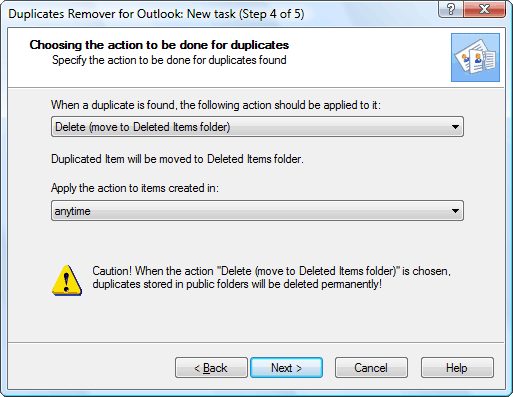
Delete (move to the Deleted Items folder) — the duplicate will be moved to the Deleted Items folder.
-
Delete permanently — duplicate messages or items will be deleted permanently (bypassing the Deleted Items folder).
Duplicates Remover is fully compatible with Microsoft Exchange Server and may be used to process public folders on server. Also, if you have the permission to connect to folders of other users, you can process folders of other users as well as that of your own folder.
Duplicates Remover for Outlook Flash tours
Quickly remove duplicated contacts in Microsoft Outlook folders. This screencast will show you how it is easy to remove duplicated items in Outlook folders with the help of Duplicates Remover for Outlook.
Download Offline Version (1278 Kb)
Duplicates Remover for Outlook Screenshots
 Selecting the type of folders to be scanned |
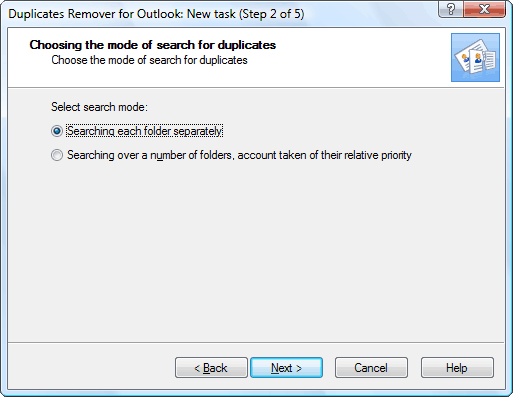
 Selecting the way to search for duplicates |
 Selecting folders to be scanned |
 Selecting mail folders for scanning and setting their priority |
 Selecting action to be performed with duplicates |
 Selection of the fields which will be used for identifying duplicates |
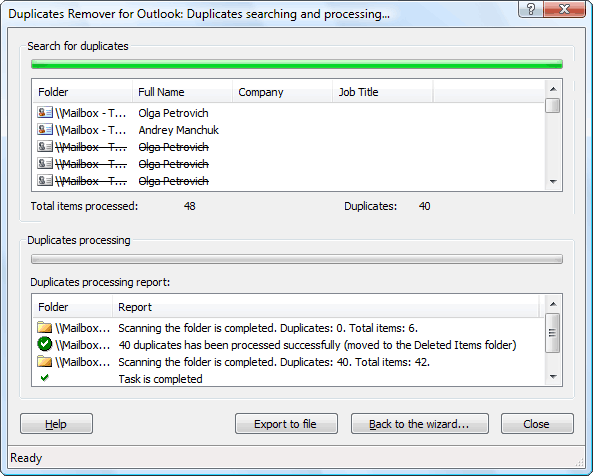
| Search for duplicates is performed |
| License type |
USD |
| Single user license |
24 |
| 5-Users license |
110 |
| 10-Users license |
190 |
| 25-Users license |
450 |
| 50-Users license |
800 |
| 100-Users license |
1200 |
* If you are interested in purchasing more than 100 users licenses, volume prices are available. Please contact us at sales@unitedaddins.com to get an attractive quote.