
 If you understand these toolbar buttons, you can already use MessageLock. Product Spec Sheet
- Encrypts Outlook email message and attachments
- Secures email messages in an AES encrypted zip-compatible envelope
- Adds zip, unzip and decryption to Microsoft Outlook
- Widely compatible with Hundreds of Millions of Computers that can already decrypt Zip files
- Easy to Use, One-Click email Encryption
- Exceeds HIPAA encryption strength requirements for protecting email.
MessageLock is virtually seamless when both sender and receiver have it installed. MessageLock will automatically decrypt inbound packets, and display the email as a regular message in your Outlook inbox. The decrypted message will be time-stamped, as proof that it was received securely.
Sending Encrypted Messages
When sending email to someone who does not have MessageLock, there are three methods you can shoose from to deliver your message securely:
1. Send using zip-compatible encryption. This method requires that the user have a zip utility (such as Tugzip.com or IZarc.org) to decrypt the MessageLock file and access the contents. The recipient may already have this software, but if not, it is free to download. Using zip encryption works very well most of the time, but occassionally a firewall may block an encrypted zip file.
2. Require the use of MessageLock Decryptor. This method requires that the recipient download MessageLock Decryptor to open the .ml256 packets that MessageLock creates. The Decryptor can be hosted from your website, if you wish. After installing the Decryptor, the user simply clicks on the .ml256 file to open your message; MessageLock Decryptor will then prompt for the password. This method has proven very reliable in delivering the encrypted packetl.
3. Send a self-decrypting file. This method allows you to create a self-decrypting .exe file which when run, will prompt the recipient for the password. The user does not require any special software. The executable file is delivered in an unencrypted zip wrapper, accessible to Windows XP and Vista without a zip utility.
Whichever method is chosen, MessageLock will remember it, and apply the settings to future encrypted emails to that recipient.
Password Storage
MessageLock can collect and manage your passwords, both for sending and receiving encrypted files. Users can begin using it immediately, and MessageLock will gather the passwords as necessary. Access to the master password list can be protected,
 Use MessageLock to:
- send secure email messages
- automatically unzip and decrypt any password protected zip files that you receive
- secure your file attachments with strong AES-256 zip-compatible encryption
- easily apply encryption and compression to your entire email message
- send encrypted emails to multiple recipients or to a group
- automatically format your email message as either a pdf, mht or msg file, depending on the preference of your recipient
- combine file attachments into a single smaller zip file
- gathers your passwords as you send email, then recalls your passwords on future correspondence
- If it is desirable to do so, you can distribute a “starter” password database. Users can optionally be locked out of password settings.
- User intuitive: very little training is necessary to use MessageLock.
- Silent install with command line key registration
- Install for all user accounts
- Multiple MessageLock installations can be activated online with a single key
- For site licenses, or where online activation is not practical, MessageLock can be activated by including a key file in the directory
MessageLock for Outlook will place your documents into an compressed and/or encrypted zip file. It can also create a self-decrypting .exe file. Users who have advanced needs to set rules for compression will find a number of options to configure MessageLock to their specific needs.


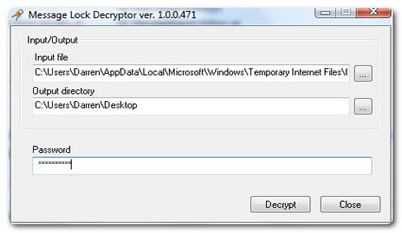 Input File is the path to the file you are opening. If you click on a .ml256 file, this is added automatically.Output Directory is the location where MessageLock Decryptor will copy the decrypted files. The default is your Windows desktop, however, you can select any location you wish.Is it Safe?MessageLock Decryptor does not contain any spyware, adware, nor any tracking or registration mechanism. We do not keep any records of who downloads MessageLock Decrytor. This is a free software package published for the benefit of MessageLock users.Please follow these guidelines when using MessageLock Decryptor:1. If you do not know the person who sent you the .ML256 file, do not open it.2. If the password was included in the email message, do not open the message.3. Scan the decrypted files with your anti-virus software before opening.How to Test MessageLock Decryptor?To see if MessageLock Decryptor installed correctly, click here to